 Skip to content

How Transcripts, Captions, Metadata, and Page Copy Work Together for Video Visibility
Last updated: June 2026
Video visibility improves when the transcript, captions, metadata, page copy, structured data, and internal links all reinforce the same topic clearly. The mistake is treating each field as a separate optimization task instead of one connected interpretation system.
Answer capsule: Video visibility improves when transcripts, captions, metadata, page copy, and internal links all reinforce the same topic clearly. Each element should help viewers understand the video and help search systems interpret what the page is about. None of these elements guarantees rankings or AI citations, but together they reduce ambiguity.
Video visibility depends on aligned signals, not one metadata field
A video page becomes easier to interpret when every visible and technical signal supports the same subject: the spoken message, transcript, captions, title, description, page copy, schema, and links to the next relevant page.
Marketing Media AI treats this as part of Marketing Infrastructure Design™ for Video: the asset is not only the video file. The asset is the complete page environment that helps a person, a search engine, and an AI-assisted discovery system understand what the video is about and why it matters.
Google’s video documentation emphasizes discoverable embeds, indexable watch pages, stable thumbnails, metadata, and structured data that is consistent with the actual video content. That supports the same practical direction: signal alignment, not metadata stuffing. See Google’s video SEO best practices.
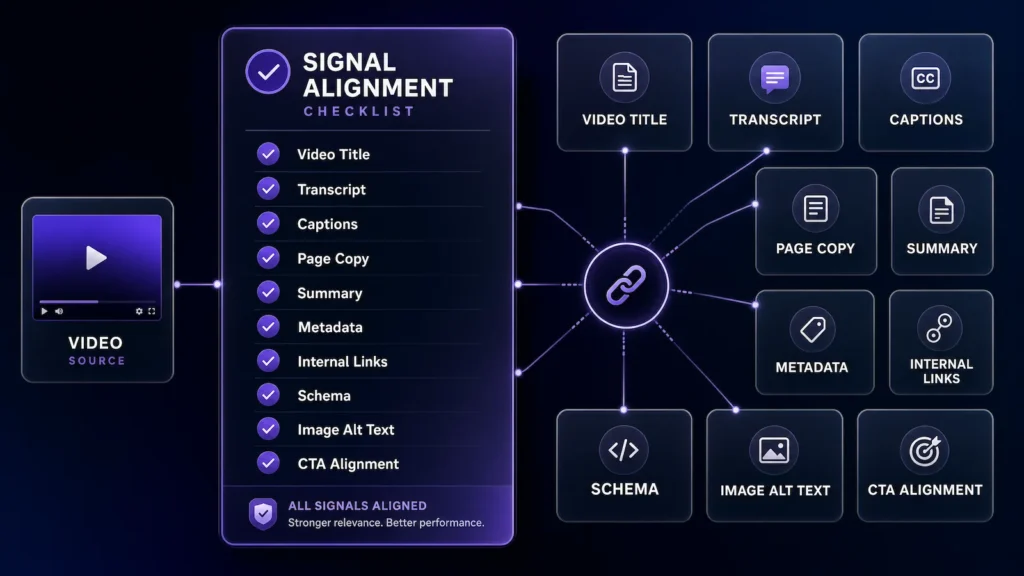
The Signal Alignment Checklist
The fastest way to improve a video page is to check whether the main signals describe the same topic in plain language. Before embedding or publishing a strategic video, review:
- Video title: Does it name the topic clearly without forcing keywords?
- Transcript: Does the spoken content support the page’s main subject?
- Captions: Are names, terms, and key phrases accurate?
- Page intro: Does it explain what the viewer will learn before the embed?
- Summary or key takeaways: Can a reader understand the value without watching first?
- Metadata: Do the title tag, meta description, video description, and file naming agree?
- Internal links: Does the page connect to the larger topic cluster or service path?
- Structured data where appropriate: Does the markup describe the visible video accurately?
- Image or video file names and alt text where relevant: Are supporting visuals named and described clearly?
- CTA and next step: Does the action match the intent of the video and page?
One issue we check for before publishing is signal drift: the title frames the video one way, the transcript explains a broader topic, and the page copy pushes a different next step. When those signals do not agree, the page becomes harder for viewers, search engines, and AI systems to interpret clearly.
How transcripts support video understanding
Transcripts turn spoken content into readable context that can support the page topic. They are useful because a strong video often contains definitions, examples, objections, decision rules, and explanations that deserve to be accessible outside the player.
For video SEO transcripts, the goal is not to dump a messy auto-generated wall of text onto the page. A useful transcript should preserve the actual message while cleaning obvious errors, speaker confusion, broken punctuation, and misheard brand or product terms.
The transcript should not fight the article. If the page is about video transcript metadata SEO, but the transcript mostly discusses general content marketing, the page sends a mixed signal. Either the page angle is wrong, the video needs a better intro, or the surrounding copy needs to explain the connection.
How captions support viewers and context
Captions support visibility indirectly by making the video easier to watch, understand, and reuse. They help viewers follow the message when audio is off or when the video includes names, frameworks, or technical language.
Captions and transcripts for SEO are not identical assets. Captions are timed to the viewing experience. Transcripts are easier to scan, quote, summarize, and connect to page structure. Both should agree on meaning, but they serve different jobs.
How metadata helps when it matches the page
Metadata helps most when it reinforces the content people can actually see and watch. A video title, upload description, thumbnail file, schema name, schema description, and page title should not sound like five different assets.
A weak metadata pattern: the video title says “AI Visibility Tips,” the page title says “Video SEO Transcripts,” the description talks about captions, and the CTA points to a general editing offer. Together, those elements create interpretation friction.
A stronger pattern uses one clear topic direction: “How transcripts, captions, metadata, and page copy support video visibility.” The transcript explains that topic. The captions preserve that language. The page copy summarizes it. The internal links point to video content for AI visibility and video production for AI search visibility when the reader needs the broader strategy or execution layer.
Why page copy matters around the video
Page copy gives the video a job. Without surrounding copy, the embed may be technically present but strategically under-explained. A page intro should tell the reader what the video covers, who it is for, and what decision it helps them make.
This matters for video content for AI visibility because discovery paths often summarize, classify, or preview information before a user watches. Google says the same foundational SEO best practices apply to AI Overviews and AI Mode, with no additional special requirements, and that eligibility does not guarantee indexing or serving. See Google’s AI features guidance.
How internal links connect the video to the larger topic
Internal links show where the video fits inside the broader content system. A transcript can explain what was said, but internal links explain what the video is connected to.
For example, this article should support the larger video content for AI visibility page, point production-ready readers toward video production for AI search visibility, and route people who need help scoping the work to the Infrastructure Brief.
This connects to the broader video search context stack, where the video itself is supported by the surrounding title, transcript, summary, metadata, page copy, structured data, and internal links.
When structured data is useful and when it is not enough
Structured data is useful when it accurately describes the visible content on the page. It is not a replacement for a clear video, helpful page copy, accurate captions, or a clean transcript.
For embedded videos, VideoObject schema can describe the video name, thumbnail, upload date, description, duration, content URL, or embed URL where appropriate. Google’s documentation says required VideoObject properties are needed for eligibility in Google Search, and recommended properties can add more information. See VideoObject structured data.
For a WordPress article with no embedded video, do not add VideoObject just because the topic is video. Use Article or BlogPosting schema. Add VideoObject only when an actual relevant video is embedded on the page.
What to avoid when optimizing video for search and AI systems
Avoid treating transcript, captions, metadata, and schema as separate hacks. That creates more surface area for inconsistency.
- Do not stuff keywords into captions, alt text, schema, or descriptions.
- Do not publish raw transcripts full of obvious auto-caption errors.
- Do not add VideoObject schema for videos that are not visible on the page.
- Do not promise AI mentions, rankings, citations, or specific placements.
- Do not let the CTA point to a different intent than the video supports.
Supporting visuals should follow the same rule. Google says filenames can provide light clues, alt text helps describe images and accessibility, and images should sit near relevant text. See Google’s image SEO best practices.
How Marketing Media AI approaches video content for AI visibility
Marketing Media AI approaches video visibility as a connected infrastructure problem. AI can help prepare transcripts, summaries, captions, metadata, and repurposed assets. Human direction still decides whether the message is clear, whether the page supports the right topic, and whether the next step matches the viewer’s intent.
For the larger strategy, read the guide to video content for AI visibility. For the execution side, use video production for AI search visibility. For the broader AI support ecosystem, see AI video services.
If you already have videos but are not sure whether the transcript, captions, metadata, and page copy are supporting the same topic, send the Infrastructure Brief. The goal is a clear recommendation before you publish more disconnected assets.
FAQ
Do transcripts help video SEO?
Yes, transcripts can help by turning spoken content into readable page context. They work best when the transcript supports the same topic as the title, intro, metadata, internal links, and structured data. A transcript alone is not a ranking guarantee.
Are captions and transcripts the same for SEO?
No. Captions support the timed viewing experience. Transcripts support scanning, reading, summarizing, internal linking, and surrounding page context. They should agree on meaning, but they serve different jobs.

