 Skip to content

What to Put Around a Video So Search Engines and AI Systems Can Understand It
Last updated: June 2026
By Michael / Marketing Media AI
Search engines and AI systems understand a video more easily when the page around the video explains what the video is, why it matters, and where it fits. A clean embed helps, but an embed alone gives weak context.
Answer capsule: Search engines and AI systems understand video better when the video is surrounded by clear page context, descriptive titles, transcripts, summaries, structured data where appropriate, and internal links that show how the video fits the larger topic. None of this guarantees visibility, but it makes the content easier to interpret.
A video needs surrounding context, not just an embed
A video page should explain the asset before a reader, crawler, or AI answer system has to interpret the embed alone. Google’s SEO Starter Guide frames SEO as helping search engines understand content and helping users decide whether to visit. For video, Google’s video SEO best practices emphasize accessibility, accurate metadata, and consistency between structured data and the actual video.
Many video pages fail before the video is watched. The title is vague. The intro says nothing. The transcript is missing. The clip has no relationship to the service page or article around it. The better approach is to treat the page as a context package: the video carries the message, and the surrounding page clarifies the topic, audience, sections, related pages, and next step.
The Video Context Stack
The Video Context Stack is the set of visible and technical signals that explain a video before it has to stand alone. It is a clarity model for building a page that makes the video easier to interpret.
- Video title: the clearest plain-language label for the asset.
- Short page intro: what the video covers and who it is for.
- Transcript or summary: crawlable text that represents the main points.
- Key sections or takeaways: a scannable breakdown of the value.
- Supporting page copy: context that explains why the video matters.
- Internal links: related service pages, guides, or articles.
- Image and video metadata: descriptive filenames, alt text, captions, titles, and upload fields.
- Structured data where appropriate: Article, BlogPosting, ImageObject, or VideoObject only when accurate.
- Clear CTA or next step: the action the reader should take after understanding the video.

Start with a clear title and page intro
The title and intro should tell the reader what the video is about before they press play. Weak title: “New Brand Video.” Stronger title: “How a Founder-Led Service Brand Can Structure a Monthly Video Workflow.”
The stronger title gives the topic, audience, and outcome. The page intro should confirm the context in one or two direct sentences. The best title is not the one with the most keywords. It is the one a real buyer, editor, or strategist would understand instantly.
Add a transcript, summary, or key takeaways
The spoken content should become useful page text, not a keyword dump. A full transcript can help when the video is educational, detailed, or quote-heavy. A concise summary can work better when the video is short, visual, or built around one point. This is where transcripts, captions, metadata, and page copy should work together instead of sending mixed signals about what the video is about.
Use this rule: if the words in the video carry the value, include a transcript or cleaned transcript. If the video is mostly visual proof, include a summary and key takeaways. If the video covers several sections, add chapter-style bullets so the page gives readers a clean scan path.
Use surrounding copy to explain why the video matters
Surrounding copy should connect the video to the buyer question, service context, or topic cluster the page supports. Before the embed, explain the job of the video. After the embed, summarize the decision or lesson it supports.
Connect the video to related pages with internal links
Internal links should show relationship, not just pass users around the site. A visibility-focused video page can point readers toward video production for AI search visibility when they need execution support, or toward video content for AI visibility when they need the broader strategy behind structured video content.
If the page discusses where AI belongs in the workflow, link to the AI video services hub. If the reader may need help deciding what to build next, route them to the Infrastructure Brief instead of forcing them to guess the right scope.
Use structured data only where it accurately describes the page
Structured data should describe the real page and real video. VideoObject structured data can make it easier for Google to find a video and understand fields such as name, description, thumbnail, upload date, duration, embed URL, or content URL. It should not be treated as a promise of rankings, rich results, or AI citations.
Use VideoObject only when an actual relevant video is embedded. Make the name and description match the visible page copy. Use a real thumbnail. Add upload date and duration when accurate. If the page is a blog article with a supporting video, Article or BlogPosting schema may also be appropriate.
What not to do when optimizing video for search and AI systems
The fastest way to weaken a video page is to optimize for systems while making the page worse for people. Google’s AI features guidance says the same foundational SEO best practices apply to AI features in Search, with no special technical requirements for AI Overviews or AI Mode beyond being eligible for Search with a snippet.
Avoid adding VideoObject schema when no real video is embedded, repeating the same title and description across clips, publishing a keyword-stuffed transcript, putting the main explanation inside an image, treating schema as a visibility guarantee, or creating thin pages for every possible AI search variation.
How Marketing Media AI approaches video production for AI search visibility
Marketing Media AI treats video visibility as an infrastructure problem before it becomes an output problem. In Marketing Infrastructure Design™ for Video, the asset, page copy, transcript, metadata, internal links, and next step should support the same topic direction.
AI can help with cleanup, formatting, caption support, repurposing, version prep, and review organization. Human direction still protects the message order, topic fit, page context, retention structure, brand voice, and final publishing decision.
For a visibility-focused production path, start with video production for AI search visibility. For broader diagnosis of topic clarity, page context, and repeated content signals, use the video content for AI visibility guide as the strategic reference.
What to check before publishing
Before publishing, check whether a reader could understand the video’s subject and role without watching every second. If the page needs the embed to explain everything, the surrounding context is probably too thin.
- Does the title clearly name the topic and purpose?
- Does the intro explain who the video is for and why it matters?
- Is there a transcript, summary, or key takeaway section?
- Do the headings and copy reinforce the same subject?
- Do internal links route to the right service, guide, or intake path?
- Are filenames, alt text, captions, and metadata descriptive?
- Is VideoObject schema used only if the embedded video is accurately described?
- Is the page indexable, crawlable, and supported by a valid thumbnail when video search visibility matters?
- Does the CTA match the reader’s next step?
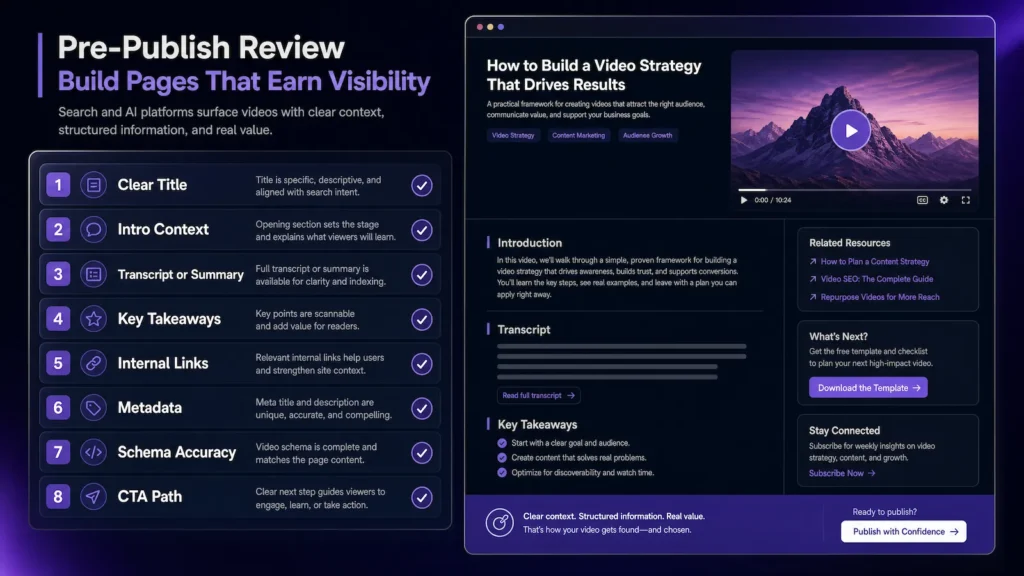
What we check before publishing a visibility-focused video page:
The main thing we check before publishing a visibility-focused video page is whether the page still makes sense if the video is not watched first. If the title, intro, summary, transcript notes, surrounding copy, and internal links do not clearly explain what the video covers, the page is not giving search engines, AI systems, or human visitors enough context.
If you already have video assets but are unsure where they should live, what context they need, or how they should connect to the site, submit the Infrastructure Brief. The goal is to identify the right publishing path before building more disconnected output.
FAQ
Do I need a full transcript for every video?
No. A full transcript is useful when the spoken content carries the main value. For short visual clips, a concise summary, key takeaways, and clear page copy may be more useful than a long raw transcript.
Does VideoObject schema guarantee video rankings or AI citations?
No. VideoObject schema can help describe an embedded video and make important properties easier for Google to understand, but it does not guarantee rankings, rich results, AI mentions, or citations.

