 Skip to content

Why AI Visuals Drift Off-Brand Without a Repeatable Visual System
Last updated: June 2026
By Michael / Marketing Media AI
AI visuals drift off-brand when every asset is generated as a separate output instead of being guided by one repeatable visual system. The fix is not a better one-off prompt. The fix is clearer direction before generation and a review pass after generation.
Answer capsule: AI visuals drift off-brand when each asset is generated as a separate prompt instead of inside a repeatable visual system. Consistency requires reference rules, palette direction, composition patterns, subject constraints, lighting standards, usage context, and a review pass that checks whether the visuals work together as a brand system.
AI visual drift usually starts before generation
AI visual drift starts when the creative direction is too loose before the first image is made. A tool can create a polished image, but polished does not mean aligned. Viewed separately, several visuals may look usable. Viewed together, they can feel like different campaigns.
This is where AI visual systems matter. The system defines what should repeat: color logic, lighting behavior, composition bias, subject treatment, material feel, and the level of realism or stylization that fits the brand.
The most common drift pattern we look for is when each AI visual looks strong by itself, but the set feels inconsistent once the images are placed together across a campaign. The issue is usually not image quality; it is mismatched lighting, palette, framing, texture, or realism level.
If the brand has not locked those rules, the model fills the gaps with whatever looks convincing in that single generation.
The Visual Drift Controls
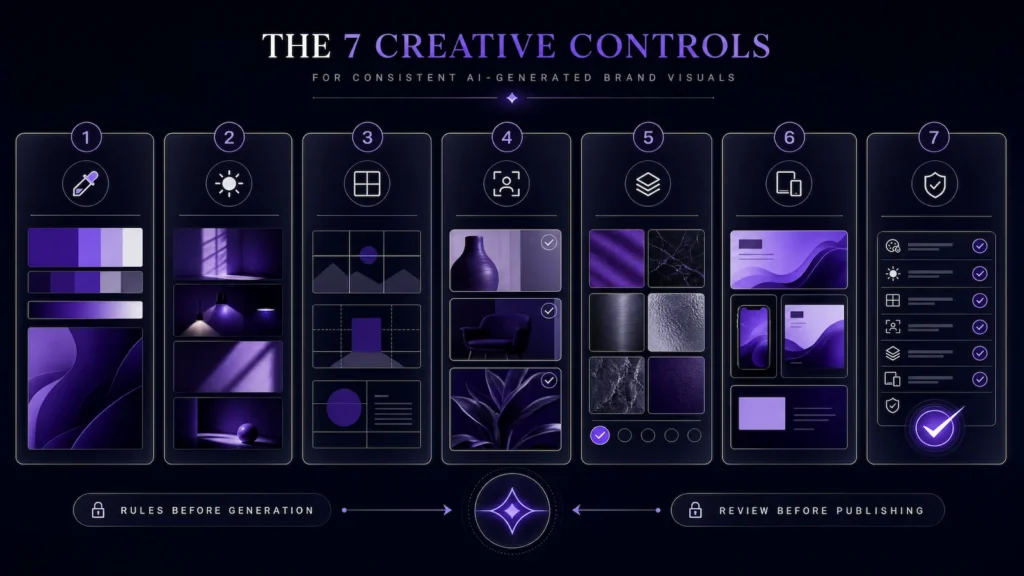
The Visual Drift Controls are the rules that keep AI images from becoming a random batch of attractive but disconnected assets.
- Palette: primary colors, accent colors, neutrals, and combinations that should repeat.
- Lighting: brightness, contrast, shadow softness, glow level, and atmosphere.
- Composition: framing, negative space, camera angle, subject placement, and hierarchy.
- Subject rules: how products, people, hands, screens, environments, and props should appear.
- Texture/style boundaries: premium, glossy, editorial, cinematic, realistic, abstract, or illustrative limits.
- Usage context: ad, blog hero, landing page image, social post, thumbnail, product scene, or video support asset.
- Review pass: the final check that asks whether the visuals work together, not just alone.
These controls do not remove creativity. They create the boundaries that make creative expansion easier to trust.
Why one good prompt is not a visual system
One good prompt can create one strong asset, but it cannot carry a brand across repeated use cases by itself. A prompt is a single instruction. A visual system is a reusable decision layer.
Most campaigns need related assets across formats: a blog hero, an ad variation, a landing page graphic, a thumbnail, a product scene, or a supporting background. Each format may need a different crop or emphasis, but the underlying visual DNA should still feel connected.
What needs to stay consistent across AI visuals
The most important consistency rules are the ones a viewer can feel before they can name. Color matters, but it is not enough.
- Brand cues: recognizable colors, materials, shapes, spatial patterns, or atmosphere.
- Visual hierarchy: where the eye should go first and how much empty space the image needs.
- Lighting logic: dark and premium, bright and clean, soft and editorial, or bold and high-contrast.
- Subject treatment: how people, products, devices, screens, rooms, or objects should be framed.
- Accessibility basics: when images include readable text or UI-like elements, contrast should be checked against WCAG color contrast guidance.
The goal is not to make every image identical. The goal is to make every image feel like it came from the same brand direction.
What can change without breaking the brand
A repeatable visual system should leave room for controlled variation. If every image uses the same layout, the brand feels templated. If every image changes everything, the brand feels unstable.
Safe variation usually happens in secondary details: topic-specific props, crop orientation, minor background changes, platform ratio, image depth, supporting accents, or product emphasis. Riskier variation happens when palette, lighting, camera angle, rendering style, and subject treatment all change at once.
A useful decision rule: change one or two creative variables per asset, not the entire visual language.
How visual systems support ads, scenes, and campaign assets
Visual systems help AI-assisted creative scale because ads, scenes, and campaign assets need different levels of variation.
AI ad variations need enough difference to test hooks, angles, offer framing, CTA structure, or visual direction. But they still need brand control so the test does not become random creative noise.
AI scene generation is different. A scene may be built for one specific project, promo, launch, or editor-ready asset. That can solve a contained need, but it is not the same as building a reusable visual framework for future rounds.
The visual system connects those paths so each output can adapt without starting from zero.
This is especially important when managing AI ad variation drift, because ad tests become harder to evaluate when the hook, offer, visual direction, pacing, and CTA all change at the same time.
How Marketing Media AI reviews AI visuals for brand fit
Marketing Media AI reviews AI visuals against the system they are supposed to support, not just against how impressive they look in isolation.
Inside a Marketing Infrastructure Design™ workflow, the better question is not “Does this image look good?” It is “Can this visual safely represent the brand where it will be used?”
- Does the visual match the approved palette and mood?
- Does the composition support the message or distract from it?
- Does the asset work in the target format without awkward cropping?
- Does the style feel connected to the surrounding campaign assets?
- Would this still feel on-brand beside the website, ad, video, or landing page it supports?
What to do before generating more visuals
Before generating more visuals, lock the system future visuals should follow.
- Choose the main use cases: ads, blog images, product scenes, social visuals, landing pages, video support, or thumbnails.
- Collect a reference rail: approved brand visuals, rejected examples, color references, lighting examples, and composition examples.
- Define the non-negotiables: palette, lighting, subject rules, camera feel, background logic, and style boundaries.
- Decide what can vary: topic, crop, product emphasis, supporting props, accent intensity, and platform format.
- Create a review checklist: brand fit, consistency, clarity, accessibility, usage context, and campaign cohesion.
If the visual direction needs to become reusable across campaigns, start with AI visual systems. If you are unsure whether the issue is visual consistency, scene creation, ad variation, or a broader production bottleneck, use the Infrastructure Brief to choose the right path before scoping the work.
FAQs
Why do AI images look inconsistent even when I use similar prompts?
Similar prompts can still leave too much open to interpretation. If palette, lighting, composition, style boundaries, and subject rules are not locked, the model may make different choices each time.
Is an AI visual system the same as a brand guideline?
No. Brand guidelines define the identity. An AI visual system translates that identity into repeatable generation and review rules for campaign assets, scenes, backgrounds, and future creative rounds.
Should every AI visual look the same?
No. The goal is controlled variation. The visuals should adapt to different formats and messages while keeping enough shared visual logic to feel connected.
Need a repeatable AI visual system?
Need AI visuals that stay consistent across campaigns instead of drifting from one output to the next? Start with AI visual systems or use the Infrastructure Brief if you need help choosing the right path.


