 Skip to content

When AI Scene Generation Strengthens a Video — and When It Becomes Decoration
Last updated: June 2026
By Michael / Marketing Media AI
AI scene generation strengthens a video only when the scene has a job: clarify context, bridge a transition, support tone, explain an idea, or give the editor useful visual coverage.
When it does not improve the message, pacing, story flow, or viewer comprehension, it is decoration – even if it looks cinematic on its own.
Answer capsule: AI scene generation strengthens a video when the scene serves a production function: clarifying context, bridging a transition, supporting tone, making an idea easier to understand, or reinforcing memory. It becomes decoration when it adds visual novelty without improving the message, pacing, story flow, or viewer comprehension.
Generated scenes should do a job in the edit
A generated scene should be judged by function before style. In Marketing Infrastructure Design™ for Video, the question is whether the scene helps the viewer understand faster or move through the video with less friction.
Strong use of AI scene generation for video starts with the role the scene plays inside the cut. A useful scene gives context, smooths a transition, supports tone, or covers a visual gap the footage cannot cover.
The Scene Function Test
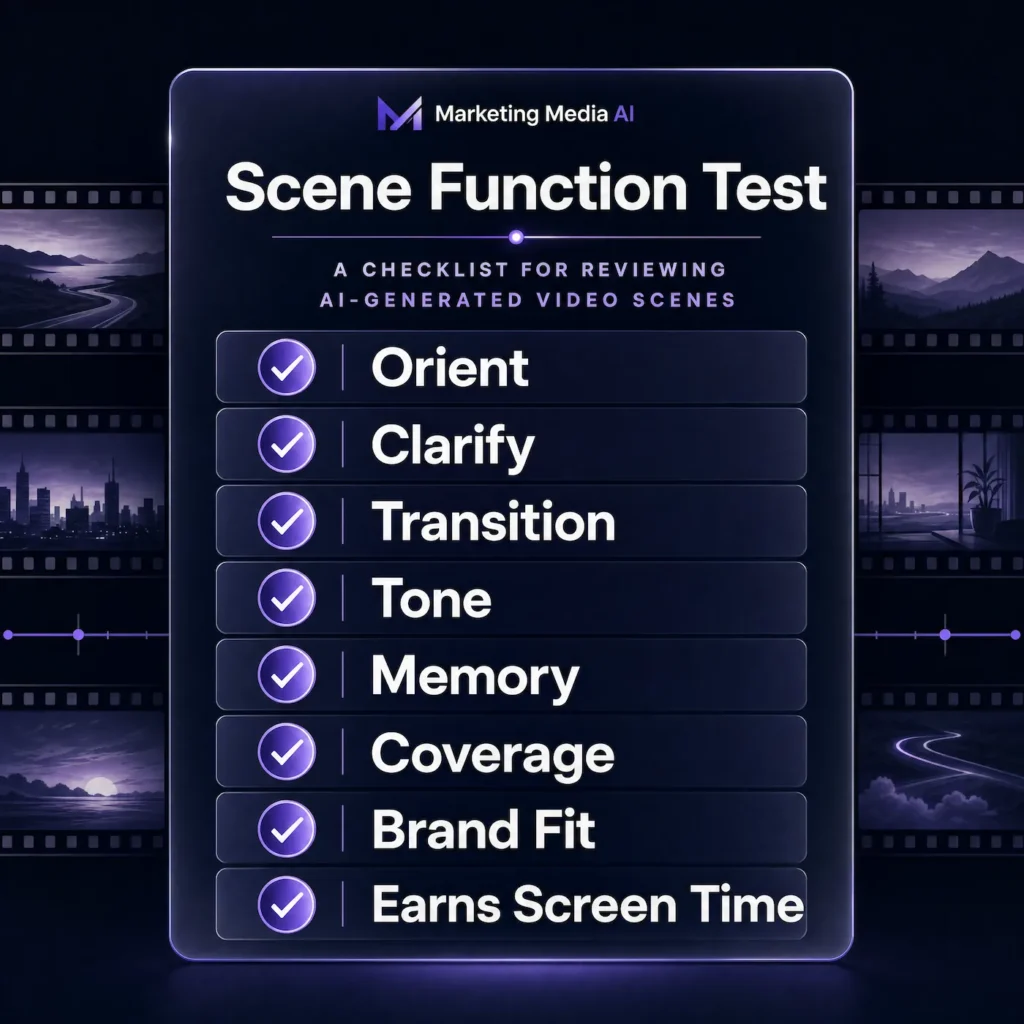
The Scene Function Test keeps AI visuals tied to the edit instead of the novelty of generation. Before a generated scene goes into a video, ask whether it passes at least one of these checks:
- Does it orient the viewer?
- Does it clarify an idea that would otherwise feel abstract?
- Does it bridge a transition between two points?
- Does it support the tone without stealing attention?
- Does it strengthen memory around the message?
- Does it give the edit useful visual coverage?
- Does it fit the brand, platform, and surrounding footage?
- Does it earn its time on screen?
If the answer is mostly no, the scene may be visually attractive but strategically weak.
When AI scene generation strengthens a video
AI scene generation strengthens a video when the available footage cannot fully support the idea. That may happen when a campaign needs a setting that was never filmed, a product needs a clearer environment, or a talking-head edit needs support visuals that reinforce the point.
Useful generated scenes usually serve visual context, transition coverage, concept explanation, or missing b-roll. The goal is not to replace the edit. The goal is to help the final video communicate more clearly.
When a generated scene becomes decoration
A generated scene becomes decoration when it looks good in isolation but does not help the sequence around it. The most common warning sign is a scene that could be removed without changing what the viewer understands.
The pattern we watch for is a generated scene that looks impressive in isolation but does not help the edit. If the visual does not clarify the point, bridge the transition, support the tone, or make the viewer understand the message faster, it becomes decoration — even if the scene itself looks strong.
Decorative scenes usually interrupt pacing, introduce an unpaid-off visual idea, weaken brand consistency, or distract from the person, product, proof, or message the viewer was supposed to follow.
How to use generated scenes for transitions and context
Generated scenes work best when they solve a specific gap between two parts of the video: problem to process, raw footage to finished result, strategy to execution, or product feature to use case.
The practical rule is simple: write the purpose of the scene before generating it. If the purpose is only “make this look cooler,” the edit probably needs a better structural decision, not another generated scene.
How to protect brand fit when adding AI scenes
Brand fit needs review before the generated scene reaches the final edit. A scene can be technically clean and still feel wrong if lighting, environment, colors, realism, or subject treatment do not match the surrounding content.
This is where AI visual systems matter. If a brand will use generated scenes repeatedly, the visual rules should not be rebuilt from scratch every time.
For broader projects, AI-assisted video production services should map where generated scenes belong in the workflow. Some videos need one transition. Others need no generated scene at all.
Publishing considerations for generated scenes
Disclosure rules should be checked before publishing generated scenes, especially when realistic people, places, events, or altered footage could be mistaken for real. YouTube gives creators platform guidelines for generated media disclosure, and rules can change over time.
Treat this as a publishing checkpoint, not legal advice. Before a video goes live, confirm whether the destination platform expects an AI or altered-media disclosure.
Why cinematic does not automatically mean useful
Cinematic output is not the same as strategic output. A scene can have lighting, depth, motion, atmosphere, and polish while still weakening the video.
The viewer cares whether the video is easy to follow. If the visual language becomes more interesting than the message, the generated scene has started competing with the edit.
How Marketing Media AI reviews AI-generated scenes
Marketing Media AI reviews generated scenes for usefulness, brand fit, edit fit, and delivery risk. The review is not only about AI artifacts. It is also about whether the scene belongs in the sequence.
A scene may be rejected if it creates the wrong tone, pulls attention from the speaker or product, makes the brand feel generic, fails the platform crop, or slows the edit.
What to do if your video needs visual support
If your video needs generated scenes, start by defining the job those scenes must do: context, transition coverage, product environment, concept visual, or reusable visual direction.
If the need is one contained scene or campaign visual, review the AI scene generation path. If you are unsure whether the project needs generated scenes, cleanup, editing, or a broader production workflow, start with the Infrastructure Brief so the scope is diagnosed before assets are made.
FAQs
What is AI scene generation for video?
AI scene generation for video uses AI-created environments, backgrounds, concept scenes, or support visuals inside a video workflow. The strongest use supports the edit, message, or campaign purpose.
When should I use AI generated scenes instead of stock footage?
Use AI generated scenes when stock footage feels generic, off-brand, or unable to show the environment or concept the video needs. Use stock when simple coverage is enough.
How do I know if an AI-generated scene is decorative?
It is probably decorative if removing it does not make the video less clear. A useful scene improves context, transition, tone, memory, or coverage.


