Skip to content

Which Intake Path Should You Use: Scorecard, Infrastructure Brief, Custom Quote, or Test Project?
Last updated: June 2026
Use the intake path that matches what you already know.
Answer capsule: Use the Scorecard when you do not know what is broken, the Infrastructure Brief when you want a human recommendation before choosing a service, Custom Quote for larger or mixed scope, and Start Your Project when you already have footage ready for a smaller test edit. The right first step depends on clarity, scope, and footage readiness.
The Four Intake Paths decision tree
Separate uncertainty, scope, and footage readiness.
- Unsure what is broken? Use the Video Infrastructure Scorecard.
- Need a human recommendation first? Use the Infrastructure Brief.
- Larger, mixed, or unclear scope? Use Custom Quote.
- Footage ready for a smaller first edit? Use Start Your Project.
Choose the starting point based on what you already know
The right intake path depends on your current clarity, not which service sounds most impressive. Before choosing, ask whether you need diagnosis, recommendation, quoting, or execution.
The most common intake issue is not choosing the “wrong” service — it is starting from the wrong level of clarity. A visitor may ask for a quote when the real need is scope definition, or request a test edit when the footage is ready but the strategy behind the video is not.
That distinction matters because Marketing Media AI uses Marketing Infrastructure Design™ for Video to route the first move around the actual constraint: structure, retention, workflow, scope, or footage readiness.
Use the Scorecard when you do not know what is broken
Use the Scorecard when you can feel that your video system is not working, but you cannot clearly name the cause. This is the diagnostic path.
The Video Infrastructure Scorecard fits when the issue may be strategy, retention, workflow, or infrastructure.
Do not use it if you already know the exact project and your footage is ready.
Use the Infrastructure Brief when you want a human recommendation
Use the Infrastructure Brief when you know you need help, but you do not want to choose the wrong path alone. This is the recommendation path.
The Infrastructure Brief is best when your content style, platform, workflow, references, and goals need to be reviewed before the next step is chosen.
A useful video project brief should reduce confusion before production starts.
Use Custom Quote for larger, mixed, or unclear scope
Use Custom Quote when the work does not fit cleanly into one contained request. This is the custom-scope path.
A Custom Quote makes sense when the project may involve multiple deliverables, several platforms, ongoing production support, ad creative, AI-assisted production layers, or a mix of services that need to be scoped together.
Do not use it as a shortcut when the real issue is unclear strategy. If the scope is not ready to quote yet, the Infrastructure Brief or Scorecard may be cleaner.
Use Start Your Project when you already have footage for a smaller test edit
Use Start Your Project when you already have footage and want to test the editing fit with a smaller contained project. This is the execution-ready test path.
Start Your Project is best when you have a clear clip, a simple goal, and enough direction for a first edit. It tests workflow, quality, pacing, cleanup, and fit before something larger.
This path is not for large footage libraries, heavy strategy, complex campaign systems, or multi-deliverable builds.
What not to do when choosing a path
The wrong starting point usually creates extra back-and-forth before the real work begins.
Do not request a custom video quote if you cannot explain the scope yet. Do not start with a test edit if the real problem is strategy or workflow. Do not use the Infrastructure Brief if you already know the exact contained project. Do not take the Scorecard if you are execution-ready.
The goal is not to make every path sound equal. The goal is to match your current situation to the right intake.
How Marketing Media AI routes projects without making every path interchangeable
Marketing Media AI routes projects by identifying the decision that needs to happen first. The Marketing Media AI services page explains the larger service paths, but this article is narrower: it helps you choose the front door.
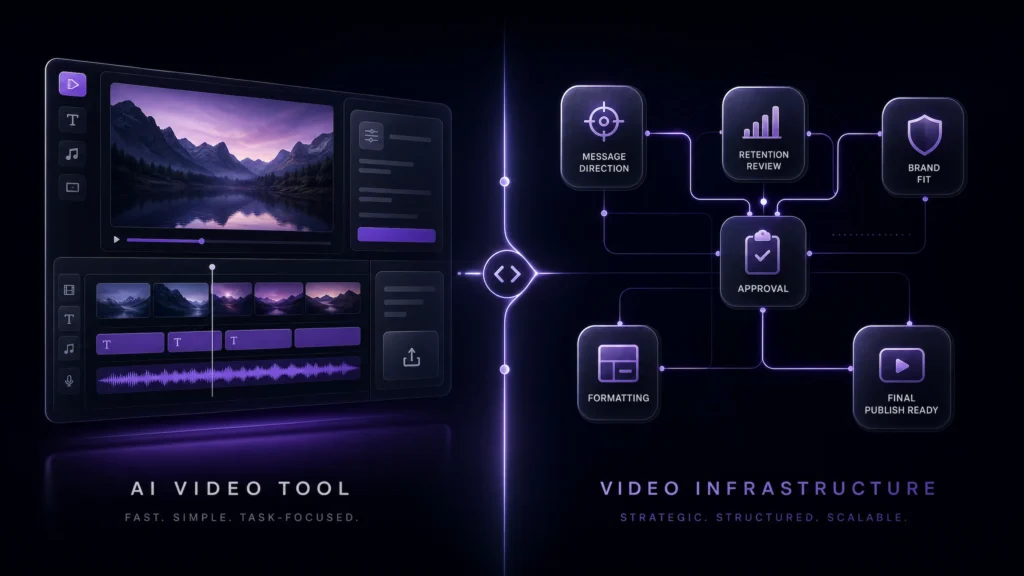
The video infrastructure method diagnoses the limiting layer before adding more output, polish, tools, or AI support.
AI can support speed, cleanup, formatting, repurposing, variation, and visual support. Human direction still protects message clarity, pacing, retention structure, brand fit, platform readiness, narrative flow, and final quality control.
Choose your next step
Choose the path that matches your current stage.
- Unsure what is broken? Take the Video Infrastructure Scorecard.
- Need a human recommendation before choosing? Submit the Infrastructure Brief.
- Have a larger, mixed, or unclear project? Request a Custom Quote.
- Already have footage for a smaller first edit? Use Start Your Project.
FAQs
What if I do not know what kind of video help I need?
Start with the Scorecard if you do not know what is broken. Use the Infrastructure Brief if you know you need help but want a human recommendation first.
What if I already have footage ready?
If the footage is ready and the project is small, use Start Your Project. If it belongs to a larger campaign, mixed deliverable set, or unclear scope, use Custom Quote.