 Skip to content

What AI Can Actually Help With in a Video Editing Workflow
Last updated: June 2026
AI helps a video editing workflow when it is given a specific, bounded job. It becomes a liability the moment it is treated as the editor, the strategist, and the final approval layer all at once. The useful question is not whether AI can touch your footage — it can — but which parts of the workflow it should support and which parts still need a human decision.
Answer capsule: AI helps most when it speeds up footage review, cleanup, formatting, transcript mapping, and version prep. It should not own message order, brand fit, pacing judgment, or the final decision to publish. The strongest setup uses AI as production support while human review protects the strategy and the last quality check.
The AI Workflow Role Map
AI belongs inside the workflow as support, not as the final decision-maker. The clearest way to keep it in its lane is to assign it to specific stages and reserve the judgment calls for a human pass.
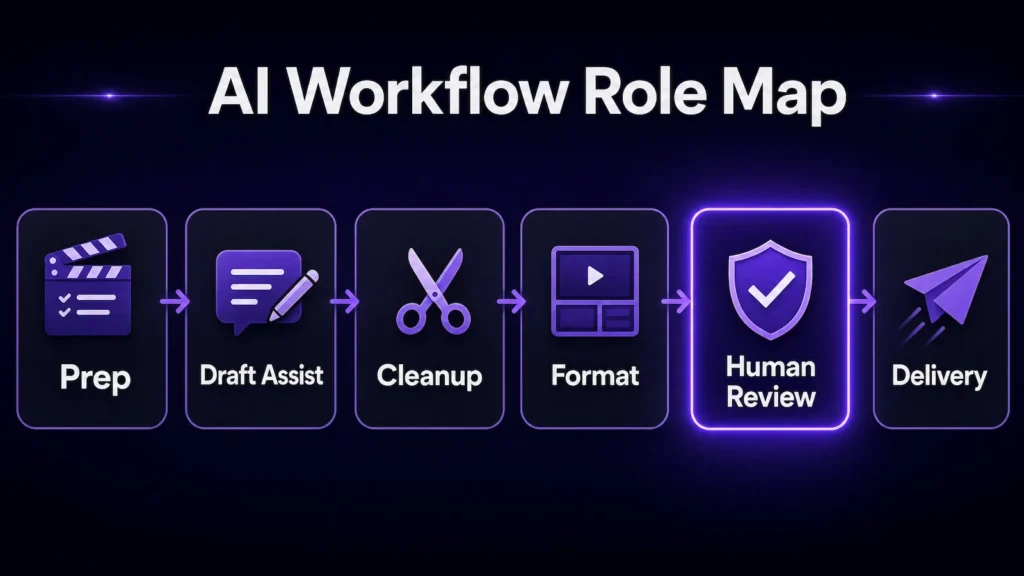
Alt text: Role map showing AI supporting prep, draft assist, cleanup, and formatting, with human review before delivery.
Placement note: Insert immediately after this paragraph.
Across a typical edit, the stages break down like this:
- Prep — organize source footage, identify transcript sections, and get the project ready for review.
- Draft assist — assemble a rough pass, surface possible highlight moments, and solve the blank-timeline problem.
- Cleanup — support audio repair, visual polish, stabilization, and enhancement when the source allows it.
- Format — prepare aspect ratios, captions, exports, and platform versions.
- Human review — check message order, pacing, retention structure, and brand fit, and decide whether the edit still feels natural.
- Delivery — export only after the video has been reviewed against its platform, audience, and goal.
The first four stages are where AI earns its place. The last two are where a person has to stay in control. This is the same separation the AI video services hub is built around: AI may support editing, cleanup, visibility, or versioning, but the project still has to be routed around the real problem before any of that speed matters.
Where AI Helps Most in the Editing Workflow
AI is most useful on the repeatable production tasks where speed improves the workflow without touching editorial judgment. In practice that means a handful of jobs come up again and again:
- Footage review support — surfacing long pauses, repeated lines, weak sections, and possible highlights. A human still decides what actually matters.
- Transcript mapping — making spoken content easier to scan and rearrange, though the transcript still needs interpretation.
- Cleanup and enhancement — audio repair, noise reduction, stabilization, and sharper presentation, as long as polish is not being used to hide a weak structure.
- Captions and formatting — caption drafts, social formatting, aspect-ratio prep, and exports, with a human checking accuracy, readability, and timing.
- Repurposing and version prep — turning longer footage into cutdowns, alternate openings, and platform-specific versions, ideally against review criteria set in advance.
- Rough-draft acceleration — producing a faster first pass when the goal is clear. The draft is a starting point, never the approval point.
One of these deserves a source note. Transcript-based editing is now a documented feature in major tools — Adobe describes its text-based editing workflow, which builds and trims sequences from a transcript. It speeds up scanning and rough assembly, but it does not decide which lines carry the message.
Where AI Should Not Make the Final Decision
Final decisions stay human because they depend on context the tool cannot see. The clearest example is message order. AI can identify strong sentences, but it does not know whether proof should land before the offer, whether a setup is necessary, or whether the call to action arrives too soon. That sequencing is the difference between a clip that persuades and one that just plays.
Pacing is the second area where judgment beats automation. A tool can detect silence and cut dead space, but pacing is not only about gaps. Some pauses let a point land. Some fast cuts feel rushed rather than energetic. Some moments need B-roll, a caption, or a tighter setup instead of a quicker trim — and only a person watching for the viewer’s experience can tell which is which.
Platform-readiness is the third. A vertical short, a YouTube explainer, a paid ad, a product demo, and a founder authority clip all carry different expectations, and an edit that works on one can fail on another. Google’s guidance for video content in search is a useful reminder that context, thumbnails, and accessible video information still matter after the edit is technically finished — the export is not the end of the job.
Why Structure Has to Come Before AI Output
A clean export is not the same as a strong video, which is why structure has to be diagnosed before production speed can help. Marketing Infrastructure Design™ exists to separate surface issues from deeper workflow problems, and the Video Infrastructure Method follows the same rule: find the bottleneck before adding edits, tools, or content volume.
This matters because AI is very good at making a weak path look finished. It can clean the audio, resize the frame, generate captions, and produce three versions while the core video still opens slowly, repeats itself, or fails to guide the viewer anywhere. Speed applied to an unclear structure just produces a polished version of the same confusion, faster.
Google makes a similar quality point for publishing in its guidance on AI-generated content: AI can help with genuinely useful work, but low-value automation is the wrong direction. For video, the test is whether AI support made the asset clearer — not just faster to produce.
What We Check Before Using AI on Footage
Before AI touches footage, the first job is deciding what the footage actually needs: cleanup, restructuring, a full edit, or a different path entirely. The check runs through a few questions:
- Is the message already clear? If the main point is buried, start with structure, not enhancement.
- Is the source quality usable? Poor audio, unstable footage, or unclear delivery limits what cleanup can fix.
- Does the footage need cleanup or restructuring? Cleanup improves presentation; restructuring improves the viewer’s path through the video.
- What platform is the final video for? The edit gets reviewed against that format, viewer behavior, and delivery context.
- One deliverable or several versions? Repurposing needs review criteria set before the extra versions exist.
- What should human review protect? Usually the opening, message flow, natural tone, brand fit, pacing, and the final approval.
The most common issue we catch during review is a polished opening with no clear reason to keep watching. The edit may look clean, but if the first few seconds do not make the point obvious, the video starts losing attention before the message has a chance to work.
Common Mistakes to Avoid
The biggest mistake is treating AI output as finished instead of as a production pass that still needs review. Almost every other mistake is a version of that one. Reaching for a tool before the goal is clear is the most common — a tool cannot choose the right edit when the audience, platform, and outcome are still undefined, so it optimizes for the wrong thing efficiently.
Close behind is fixing surface quality while ignoring structure: cleaner audio and better captions do not rescue a confusing sequence, they just make the confusion sound professional. Generating too many versions without review rules creates a different drag — more options slow the decision when the winning criteria were never set. Stripping every pause automatically is its own trap, because strong pacing is controlled rhythm, not constant cutting. And the quietest mistake is approving a draft because it looks polished, when brand fit, clarity, and publish-readiness still need a human to sign off.
When AI-Assisted Editing Makes Sense
AI-assisted editing is the right call when source material already exists and the main need is a cleaner, clearer, platform-ready asset. Talking-head footage, webinars, podcasts, product demos, tutorials, screen recordings, cutdowns, and repeatable social workflows are all good fits — AI can support the review, cleanup, captions, formatting, and version prep while a human protects the decisions that carry the brand. For the broader path, AI-assisted video editing services is the main guide; this article explains the workflow thinking, and that page owns the larger editing-support path.
Frequently Asked Questions
Can AI edit a video by itself?
Some tools produce rough edits or automated versions, but that does not make the video ready to publish. Message order, pacing, brand fit, context, and final approval still need human review before the asset represents the brand.
Where does AI help most in video editing?
It helps most with review support, transcript mapping, cleanup, captions, formatting, rough-draft acceleration, and version prep — the tasks that reduce production drag without handing strategy to the tool.
When should a human review AI-assisted video edits?
Before the rough cut becomes final, before captions are approved, before exports are delivered, and before the asset goes out as the brand. Each of those is a point where a small miss becomes a published one.
Need Help Deciding Where AI Fits?
If you have footage, a draft, or a workflow that is not quite working, start the Infrastructure Brief. The goal is to route the project before you choose a service, so AI supports the right part of the workflow instead of covering up the wrong problem.


